

Lilliput HDMI 7" field monitor rental in Bangalore — see what your camera is really capturing
A working DOP's guide to using a 7-inch on-camera monitor for focus, exposure, and client-facing playback — and why the LCD on your camera lies to you on every shoot.
There's a moment on every serious shoot when you stop trusting the back of your camera. It happens when you're chasing a moving subject through harsh midday sun in Cubbon Park and your screen has flared white. Or when you're shooting a dialogue scene at f/1.4 on a Sony FX3 and you can't tell if the focus locked onto the eyelash or the eyebrow. Or when the client peering over your shoulder asks "is that in focus?" and you genuinely cannot answer them on a 3-inch tilt screen. That's the moment a field monitor stops being a luxury and becomes the tool that lets you do your job confidently.
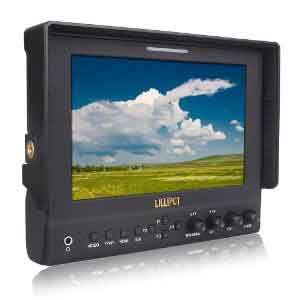
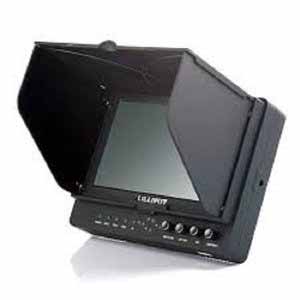
The Lilliput 7" HDMI field monitor is the workhorse on-camera display that working filmmakers in Bangalore rent more than any other monitor in our inventory. It's not the most expensive option (a SmallHD 702 Touch costs four times more). It's not the brightest. But it nails the three things that actually matter on set — accurate focus, honest exposure, and a screen big enough that your client can see what you're shooting without crowding the camera.
What a field monitor actually solves on set
A camera's built-in LCD lies to you in three specific ways, and once you understand them, you'll never shoot a paid job without an external monitor again.
First, it's too small for critical focus at modern sensor resolutions. A 3-inch screen showing a 4K image scales the picture down so aggressively that focus discrepancies of 2–3 cm at the subject look identical on screen. On a 7-inch monitor with focus peaking turned on, those differences become impossible to miss. Second, the camera screen isn't bright enough for outdoor work. Most mirrorless LCDs top out at 500–600 nits, which becomes unusable in direct sunlight — you end up shooting blind, hoping the EVF reading was right. A field monitor with proper sunshade gives you something readable. Third, the camera screen doesn't show you the technical scopes that tell you whether your image is actually correct: waveform, vectorscope, histogram, false color, zebras. These aren't optional for paid client work. They're the difference between consistent footage and a guessing game.
For Bangalore wedding cinematographers, corporate video crews, music video DPs, and YouTube creators graduating to professional setups — the 7-inch class of monitor is the right starting point. It's large enough to actually use as a focus tool, small enough to mount on a cage or shoulder rig without becoming awkward, and powered by the same Sony NP-F batteries you probably already have for your LED panels.
What's in the rental kit
Our Bangalore rental ships with the Lilliput 7" HDMI monitor body, the included articulating arm or shoe-mount bracket (specify which fits your rig when booking), the sun hood that clips over the screen for outdoor visibility, the wall power adapter, and a tested HDMI cable. The monitor takes Sony L-series batteries (NP-F550, NP-F750, NP-F970) for portable power — we can include rental batteries and a charger as an add-on if you don't already own them. Tell us your camera body when booking and we'll bundle the right HDMI cable: micro-HDMI for Sony A7 series, mini-HDMI for Canon R5/R6, or full-size HDMI for cinema cameras and Blackmagic bodies.
The features that earn this monitor its rental fee
Lilliput monitors include the full suite of professional video assist tools, and on a paid shoot you'll use almost all of them. Focus peaking overlays a coloured edge (red, blue, yellow, or green — switchable) on whatever the camera has in sharp focus. Set the threshold and colour to contrast against your scene, and pulling focus becomes a visual confirmation rather than a guess. False color assigns a different colour to each exposure zone — magenta for highlights, green for skin tone exposure, blue for shadows. Once you train your eye on it, you'll set exposure faster than any waveform reading. Zebra patterns at 70% and 100% IRE show you exactly where you're clipping highlights or losing skin detail. Waveform and vectorscope displays let you check overall luminance and chrominance at a glance — essential for matching shots between cameras on multi-cam shoots.
The 1920×1200 IPS panel resolves enough detail at 7 inches that you can actually trust focus peaking, even on full-frame mirrorless bodies shooting in 4K. The viewing angles hold up at 178°, which matters when the director is standing to the side of the operator. And on most Lilliput models, you can load 3D LUTs in .cube format via SD card — so if you're shooting log footage, you can apply a basic Rec.709 LUT and see something close to your final grade on set, instead of staring at flat washed-out S-Log.
Brightness and outdoor visibility — the honest answer
This is where you need to know what you're renting. Standard Lilliput 7-inch monitors come in around 400–500 nits brightness. That's perfectly fine for indoor shoots, shaded outdoor environments, golden-hour work, and overcast days. With the included sun hood, it's usable in moderate Bangalore daylight.
It is not a daylight monitor. If you're shooting outdoor commercials in 12pm Bangalore sun, lifestyle content on the open terrace of a venue, or anything in genuinely harsh direct sunlight without shade — you need a 1500–2200 nit high-bright monitor. We carry both classes, so tell us your shoot conditions when you book. Renting a standard-brightness monitor for a midday outdoor shoot leads to squinting at a glare-coated screen and missing focus on every take. That's the wrong rental.
For mixed shooting conditions where some takes are interior and some are exterior, the standard 7" with the sun hood handles 80% of real-world Bangalore shoots — including most weddings, indoor events, and shaded outdoor work. Use the hood, position the monitor away from direct sun, and you'll be fine.
Powering the monitor on long shoot days
The monitor draws roughly 7–10W during normal operation. A single Sony NP-F750 battery (4400 mAh) gives you about 3.5 to 4 hours of runtime with backlight at 70%. A NP-F970 (6600 mAh) pushes you to 5–6 hours. For a full wedding day or an 8-hour corporate shoot, plan to carry two batteries minimum and swap during the lunch break. We include a dual-bay charger with rental battery packs, which lets you charge a spare while shooting on the other.
If you're working in a controlled studio environment, use the included wall adapter. The monitor runs cooler, the brightness stays consistent, and you free up your battery budget for other gear. Most studio shoots in Bangalore — corporate interviews, podcast multi-cam, e-commerce video — benefit from running the monitor on AC.
Mounting on cages, gimbals, and tripods
The Lilliput 7" weighs around 450–500g without battery — enough that mounting matters. On a top-handle cage setup (SmallRig, Tilta, 8Sinn), the standard articulating arm with cold shoe foot works well; just tighten every joint properly because the screen will sag during long handheld takes if you don't. On gimbals like the DJI RS3 Pro or Ronin 4D handle, the monitor adds rotational mass that affects balance — many gimbal operators mount it on a separate magic arm clamped to the gimbal handle rather than directly on the cage, which keeps the gimbal payload lighter.
For tripod-based interview work, mount the monitor on the tripod's accessory arm rather than the camera. This frees up your camera rig and lets the director or client view footage without crowding the operator. Browse our Motion Devices category for compatible mounts and gimbal accessories.
When the Lilliput HDMI isn't the right rental
Rent the Lilliput SDI version instead if your camera outputs SDI (Sony FX6, FX9, Canon C300, C500, RED Komodo) and you need long cable runs. SDI handles 100m+ runs without signal degradation; HDMI starts struggling past 10 metres without active cables or extenders. Rent an SDI-capable monitor for any broadcast, live event, or studio setup where the monitor needs to sit far from camera.
For shoots that need recording capability — backup recording, ProRes capture, RAW recording from Sony FX3 or Canon R5 C — you want an Atomos Ninja V or similar recorder/monitor combo, not a pure monitor. The Lilliput is display-only; it doesn't record. Rent the Lilliput when monitoring is the job, the recorder when capture matters more.
For DIT work or colour-critical reference monitoring on commercial shoots, the Lilliput is below the threshold. You want a calibrated SmallHD or Atomos Shogun in those scenarios. The Lilliput is a focus and exposure monitor, not a colour reference monitor. Be honest about the level your shoot needs.
Pre-shoot checklist
.cube format before leaving homeBangalore rental and pickup
The Lilliput HDMI 7" field monitor is available at our Bangalore counter for same-day, weekend, and multi-day rentals. We deliver across the city and bundle pricing for full kits — pair this with a body from our camera inventory, lenses from our lens collection, lighting from our LED rental list, or grab a ready-made combo. Apply code COOL25OFF at checkout for 25% off until 31st July 2026.
Frequently asked questions
Will this monitor work with my Sony / Canon / Panasonic camera?
Yes — the Lilliput accepts HDMI signals from any modern mirrorless or DSLR. Sony A7 IV, A7S III, FX3, FX30, ZV-E10, Canon R5, R6 Mark II, R7, R8, Panasonic GH5, GH6, S5 II, Lumix S1H, Nikon Z6 II, Z7 II, Z8, Z9 — all confirmed compatible. The cable type differs by camera (micro-HDMI on most mirrorless, full-size HDMI on cinema bodies), so we bundle the right one when you book.
Does it record video, or only display it?
Display only. The Lilliput is a monitor, not a recorder. If you need ProRes or external RAW capture from a Sony FX3 or Canon R5 C, you want an Atomos Ninja V or similar recorder/monitor combo. The Lilliput is for monitoring focus, exposure, and framing — which is what 90% of shoots actually need.
Can I use it outdoors in direct sunlight?
In moderate outdoor light with the sun hood, yes. In harsh direct midday sunlight, no — you'll need a high-bright (1500–2200 nits) monitor. Tell us your shoot conditions when booking and we'll recommend the right brightness class. Most Bangalore shoots work fine with the standard model plus the hood.
How long do the batteries last?
A Sony NP-F750 runs the monitor for roughly 3.5–4 hours at typical brightness. NP-F970 stretches that to 5–6 hours. For a full-day wedding or all-day corporate shoot, carry at least two batteries and a dual-bay charger. We include the charger with rental battery packs.
Does it support 4K input?
Yes. The Lilliput accepts 4K HDMI input and downscales it to the native 1920×1200 panel for display. You can monitor 4K signals from FX3, R5, R6 Mark II, GH6, and similar cameras. The display itself is 1080p-class resolution, but 4K signal compatibility means no source-side issues.
Can I load custom LUTs?
On most Lilliput 7" models, yes — load your .cube format 3D LUTs onto an SD card and apply them through the menu. This is useful for shooting log profiles (S-Log3, V-Log, Canon Log) and previewing graded footage on set.
Should I rent the HDMI or SDI version?
HDMI for mirrorless, DSLR, and most prosumer cameras with cable runs under 10 metres. SDI for Sony FX6/FX9, Canon C300/C500, RED, and any setup where the monitor sits far from the camera or you're working in a multi-camera broadcast environment. SDI handles 100m+ runs without signal loss; HDMI starts degrading past 10 metres.
Is the sun hood included in the rental?
Yes. The fabric sun hood that clips over the screen ships with every rental. It folds flat for transport and provides enough shade that you can read the screen even in bright outdoor environments. Always pack it — even shoots that start indoors often spill outside.