Please Select a Location

Chennai

Coimbatore

Bengaluru
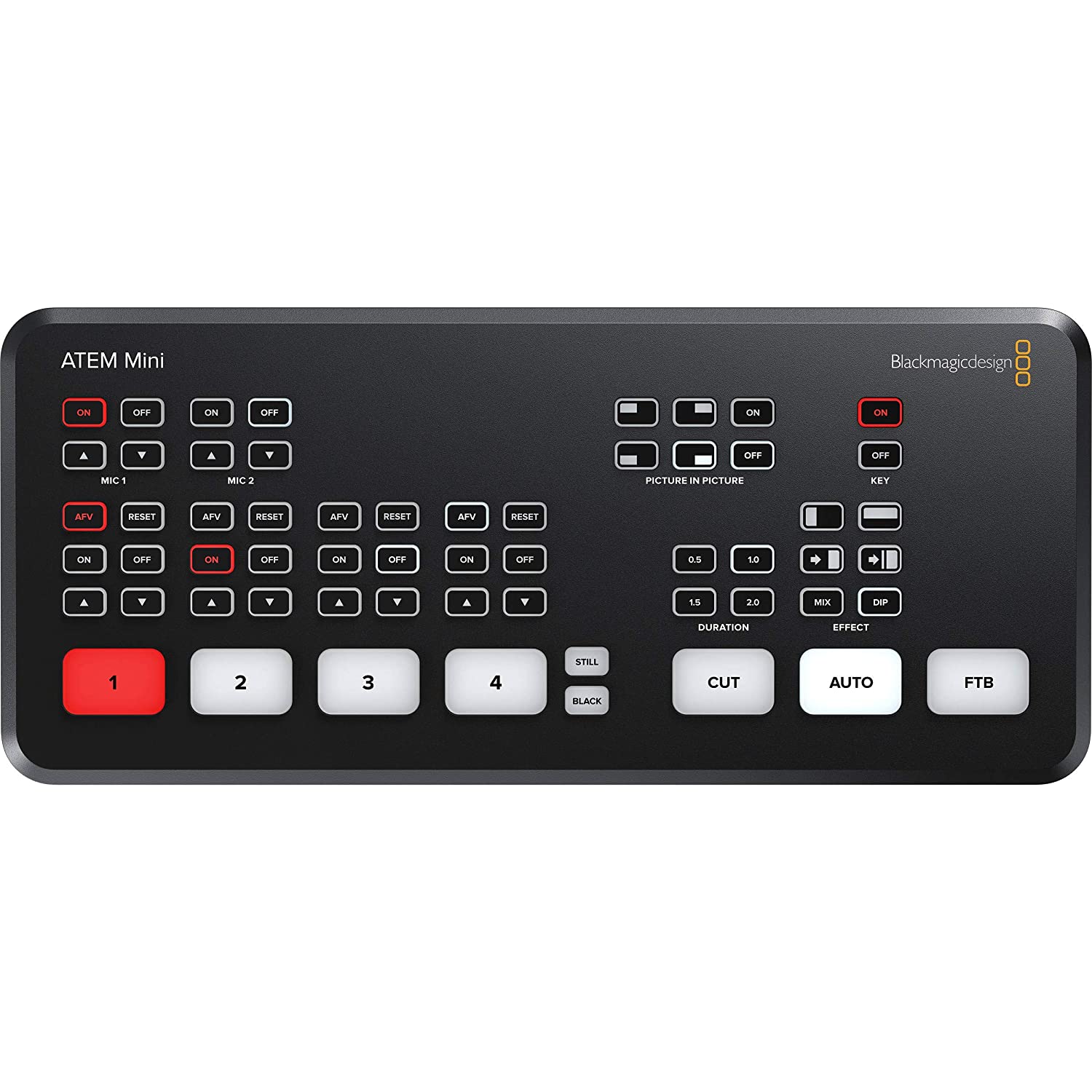
There's a moment in every live event where things either work or they don't, and you find out in front of an audience. Whether it's a CEO town hall streaming to 4,000 employees on YouTube unlisted, a Sunday church service going out to a global congregation, a wedding being broadcast to relatives in three countries, or a panel discussion at a Bangalore tech conference — the difference between a clean show and a public disaster usually comes down to one decision made days earlier: software switcher on a laptop, or a hardware switcher on the desk.
The Blackmagic ATEM Mini Pro exists because hardware wins almost every time. It's the reason production companies in Bangalore keep one in the kit even when they own a full OBS rig. It's also the reason we get repeat ATEM rentals from corporate AV teams, churches, ed-tech companies running live classes, and wedding cinematographers who've graduated from single-camera coverage to proper multi-cam streams. If you're shooting a live event in Bangalore and need a switcher that won't crash on you mid-broadcast, this is the workhorse to rent.
OBS is free, flexible, and runs on a laptop you already own. So why rent a ?1,200-a-day box that does roughly the same thing? Three reasons that matter the moment money is on the line.
First, a hardware switcher cannot crash the way a laptop can. No Windows update popup mid-stream, no Chrome tab eating RAM, no driver conflict with a USB device. You power it on, plug in HDMI, and it works. For a paid client event, that reliability is the entire product.
Second, the encoder is a dedicated chip, not a shared CPU. Software encoders share resources with the OS, your switcher software, your virtual cam plugins, and whatever else is running. Push the laptop a little too hard during a Q&A segment and the bitrate stutters. The ATEM's hardware H.264 encoder runs on its own silicon, untouched.
Third, the switching is genuinely instant. Tap a button, the program out cuts. No frame drops, no software latency, no race conditions. For panel discussions and interviews where you're cutting between speakers in real time, this responsiveness changes how confidently you can direct the show.
For corporate AV teams in Bangalore running events at hotels like the Taj West End, Sheraton Grand Whitefield, or Conrad — and for wedding livestream specialists working at Palace Grounds and large banquet halls — this reliability is exactly why the ATEM is in the kit.
The Bangalore rental ships with the ATEM Mini Pro switcher unit, the official Blackmagic 12V power adapter, a USB-C cable for connecting to a recording laptop or as a webcam source, and the printed quick-start guide. We do not include HDMI cables by default because cable length depends entirely on your venue layout — but tell us your camera positions when you book and we'll bundle the right lengths (1.5m, 3m, 5m, or 10m active HDMI for longer runs). We also stock HDMI extenders over Cat6 if your camera is more than 15 metres from the switcher, which is common at conference venues and large halls.
Every unit is tested for HDMI handshake reliability, firmware-updated to the latest stable release, and the streaming presets are wiped clean — so you'll set up your YouTube or Facebook stream key fresh, not inherit someone else's destination.
The ATEM Mini Pro accepts four HDMI sources at up to 1080p60. That sounds straightforward, but the practical question is: will your specific cameras hand off a clean signal? This is where most first-time renters get burned.
Consumer DSLRs and mirrorless cameras output an HDMI signal that includes overlay data — focus boxes, recording indicators, exposure info, the works. The ATEM cannot strip those overlays. You need to enable clean HDMI output on the camera before the event. On Sony A7 IV / A7S III / FX3, it's in the HDMI settings menu under "Info Display." On Canon R5, R6 Mark II, and R7, you'll find it under "HDMI Display." On Panasonic GH5/GH6, set HDMI output to "off" for OSD info. On Lumix S5 and S5 II, it's under HDMI Recording Output. Test every camera the day before. We've had clients arrive at events with focus brackets baked into their live stream because nobody verified.
The second issue is automatic standard conversion. The ATEM accepts mixed inputs — one camera at 1080p25, another at 1080p50, a laptop at 1080p60 — and converts them all to your project frame rate. This is genuinely useful. But it adds a frame or two of latency on the converted inputs, so for sync-critical work (musical performances, anything with click tracks), match all your camera frame rates upstream and let the ATEM pass them through natively.
Inputs 3 and 4 also support computer signals natively, including 1080p59.94 and 1080p60 from a MacBook or Windows laptop. Connect a presenter's laptop directly for slides, and you don't need a separate scaler.
The ATEM Mini Pro's headline feature is the built-in hardware streaming engine. Plug an Ethernet cable into the back, configure your YouTube or Facebook stream key once via ATEM Software Control (free Mac/Windows app), and the box streams directly to the platform. No OBS. No streaming PC. No encoder software.
The thing nobody tells you: your internet connection becomes the single point of failure. The ATEM streams at up to about 9 Mbps for 1080p60 high-quality, which means you need a stable 12–15 Mbps upload minimum, ideally on a wired Ethernet line. If you're streaming from a venue that runs on hotel WiFi or a shared office network, the stream will buffer, drop frames, and embarrass you in front of the audience. Always — always — test the upload speed at the venue before the event, ideally at the same time of day as the actual show. Bangalore corporate venues often have fine speeds at 10am and saturated networks by 2pm when everyone's in meetings.
Carry a backup. A 4G/5G mobile hotspot, a Jio fibre dongle, or your phone's hotspot. The ATEM only takes one Ethernet input, but you can switch the upstream connection in seconds if the primary network fails.
Also: configure the stream before the event, not at the venue. Open ATEM Software Control, paste your stream key, save the configuration, and test-stream to an unlisted video. Doing this for the first time at a live event with the client watching is how careers shorten.
The ATEM Mini Pro records the program output to a USB-C drive at the same time it's streaming, which gives you a high-quality master file for post-event editing or re-uploads. But the drive matters. SSDs only — spinning hard drives can't sustain the write speeds. Format as exFAT (not NTFS, not APFS). And don't use cheap USB sticks; they'll drop frames mid-recording and leave you with a corrupted file.
Recommended: a Samsung T7 or T7 Shield SSD, a SanDisk Extreme Pro Portable SSD, or any USB-C SSD rated for sustained 100+ MB/s write. We can include a tested rental SSD with the kit at an additional fee — useful if you don't already own one.
Important caveat: the ATEM Mini Pro records the mixed program output, not individual camera feeds. If you need separate ISO recordings of each camera (for podcast post-production, multi-angle re-edits, or any workflow where you want to recut the show later), rent the ATEM Mini Pro ISO instead — it records all four inputs as separate files plus the program. This is the single biggest reason to upgrade to the ISO version, and we keep both in the Bangalore inventory.
Connect the ATEM to a laptop via USB-C and the entire switcher appears as a single webcam input in Zoom, Microsoft Teams, Google Meet, Webex, and any browser. This is how most corporate clients use it: a multi-camera town hall or all-hands streamed into a single Zoom webinar with proper camera switching, lower thirds, and graphics — not the four-tile gallery view that screams amateur production.
For hybrid events where some attendees are in a Bangalore boardroom and others are joining remotely, this single feature justifies the rental. The CEO speaks to the camera, you cut between wide and tight angles, drop in slides from the laptop input, and remote attendees see a polished broadcast instead of someone's MacBook camera.
The Fairlight audio mixer handles per-input audio levelling, EQ, compression, and a 3.5mm input for an external mic or mixer. Audio follow video is the setting most people miss — when enabled, the audio for each input only goes live when that camera is on program. Without it, you'll have a cough on Camera 2's mic going out over a Camera 1 close-up. Switch this on for almost every event.
The chroma keyer works for green screen segments — useful for ed-tech and corporate explainer streams. The DVE (digital video effects) engine handles picture-in-picture, which is how you get a presenter inset over a slide. The media pool stores up to 20 still images for lower thirds, logos, and end cards — preload these on ATEM Software Control before the event so the operator just needs to tap a macro button to bring them up.
Macros are the secret weapon. Programme a macro for "show speaker name lower third + dip audio + cut to camera 2," tie it to a single button, and your live director becomes one person instead of three.
Rent the ATEM Mini Pro ISO if you need individual camera recordings for post-edit. Rent the ATEM Mini Extreme if you need 8 inputs, multi-platform simultaneous streaming, or more advanced workflows like dual chroma key. Rent an SDI-capable switcher like the ATEM Television Studio HD8 if your event is at a broadcast-grade venue with long SDI cable runs and timecode requirements. Skip the ATEM entirely and use OBS on a powerful machine if your budget is tight and you only need 1–2 cameras.
This switcher tops out at 1080p60. If your client has explicitly asked for a 4K live stream — rare in India, but it happens for premium product launches — the ATEM Mini Pro is not the right pick.
The day before your event, run through this list and you'll avoid 90% of live-streaming disasters. Update firmware via ATEM Software Control. Configure stream keys for YouTube/Facebook and save the profile. Format your USB-C SSD as exFAT and run a 10-minute test recording. Enable clean HDMI on every camera you'll use and label each cable to match the input on the switcher. Test the venue's internet upload speed. Charge a 4G hotspot as backup. Pre-load logos and lower thirds into the media pool. Set audio follow video. Run a full rehearsal with all sources live for at least 15 minutes — including the streaming destination, even if it's an unlisted test stream. Bring the power adapter; the ATEM does not run on battery.
The ATEM Mini Pro rents at our Bangalore counter for ?1,200 per day — a special Bangalore-only rate that's lower than our standard ?1,300/day price. Apply coupon code COOL25OFF at checkout and you get an additional 25% off, bringing the daily rental down to ?900 per day until 31st July 2026. Multi-day bookings, weekend event packages, and bundled rentals (camera + switcher + lights + audio for full event coverage) are available — call our Bangalore team to put together a kit list for your specific event.
We deliver across Bangalore for paid setups and offer pickup-return for self-service. For multi-day corporate engagements, we can also dispatch a technician to set up and brief your operator at the venue.
Can the ATEM Mini Pro stream to YouTube and Facebook at the same time? No. It streams to one platform at a time. To stream simultaneously to multiple platforms, either rent the ATEM Mini Extreme, or use a service like Restream.io as your destination — point the ATEM at Restream, and Restream forwards your stream to multiple platforms.
Do I need a computer to use it? For basic switching, recording, and streaming — no. The buttons on the unit handle everything once it's configured. For initial setup of stream keys, advanced audio mixing, macros, and the media pool, you'll need a Mac or Windows laptop running the free ATEM Software Control app, connected via USB-C or Ethernet.
Will it work with my Sony / Canon / Panasonic mirrorless camera? Yes — but only if the camera supports clean HDMI output, which all modern mirrorless cameras do. You must enable clean HDMI in the camera's menu before the event. Older Canon DSLRs (T-series Rebels, older 80D) do not have clean HDMI and will pass focus boxes and recording indicators to the switcher.
What's the difference between the Mini, Mini Pro, and Mini Pro ISO? The base Mini has no streaming or recording. The Mini Pro adds direct streaming, USB recording of the program output, and multiview. The Mini Pro ISO adds individual camera ISO recordings, allowing you to re-edit each camera angle in post.
Can I record without streaming? Yes. Plug in a USB SSD and hit record. The streaming function is independent — you can stream without recording, record without streaming, or do both simultaneously.
How many cameras does it support? Four HDMI cameras simultaneously. Inputs 3 and 4 also accept computer signals for slides and screen sharing.
What internet speed do I need for live streaming? A stable wired Ethernet connection with at least 12–15 Mbps consistent upload for 1080p60 high-quality streaming. Test at the actual venue before the event, and always carry a 4G/5G hotspot backup.
Does the ATEM Mini Pro do 4K? No. It supports up to 1080p60. For 4K live production, you'll need a different switcher class entirely.